
What is myRota? Your itinerary, routes and travel memories in one app
myRota brings day-by-day itineraries from real travellers, AI routes with RotaAI, a digital travel collection and traveller rewards into one app.
- Category
- myRota guide
- Route
- Tokyo HND
- Date
- Read
- 4 min
 HND
Most trips are planned the same way: thirty saved Instagram posts, a friend's "you have to go here" message, a dozen blog posts open in tabs and a spreadsheet that stopped being updated two weeks ago. Once you are actually on the road, none of it is where you need it. myRota was built to pull all of that into one place.
In short, myRota combines day-by-day itineraries written by people who have walked the city themselves, an AI route builder called RotaAI, a travel collection and a community of travellers. It's on the App Store for iPhone and on Google Play for Android.
Ready-made programs from people who did the trip
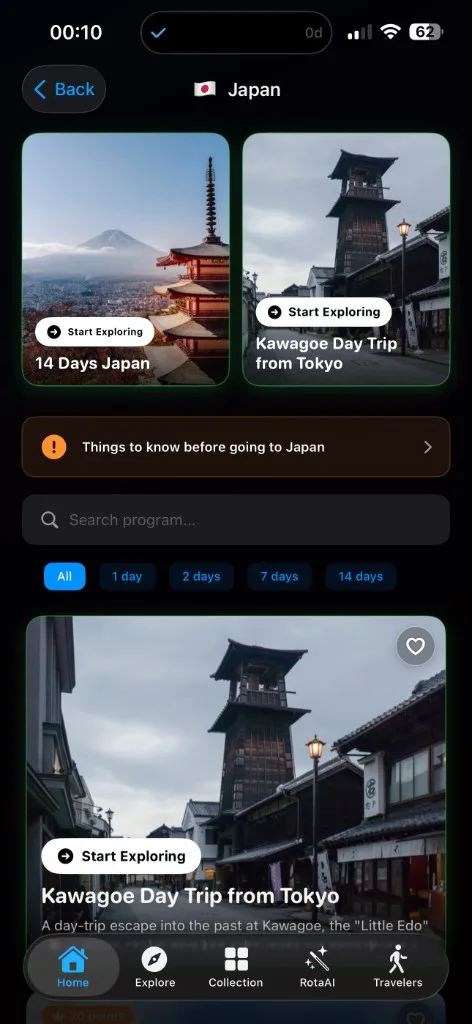
The core of the app is its ready-made programs. They are not scraped "top 10" lists. Each one was put together by a traveller who visited the city and thought about which day, which order and which neighbourhood make sense together. There are 1, 2, 7 and 14-day options for Japan, Korea and the Balkans, plus themed routes such as Harry Potter filming locations, K-drama spots and places where Turkish TV series were shot.
The most popular program is 14 Days Japan. It starts in Osaka, moves through Nara and Kyoto to Tokyo, and fits in a day trip to Kawagoe. If you want to see how a route like that is built, read our 14-day Japan itinerary for first-timers.
Your copy, your pace
A good plan still has to fit the person following it. Some people want to be at a shrine by 7 am, others don't leave the hotel before eleven. Once a program is in your library, you can reshape it:
- Delete activities or drag them into a different order.
- Add other places in the city from the database.
- Add or remove whole days, so a 7-day plan can become a 5-day one.
- Get directions to the next stop with one tap.
- If you overdo the edits, go back to the original program with one tap.
That last one sounds minor. In practice it's what makes people comfortable experimenting, because the original is always one tap away.
Know the place before you get there
Every stop has its own page with a photo gallery, reviews from other travellers and the map location. When you arrive, you check in, and the program shows how far through the day you are. At night, "what did we actually see today?" answers itself.
Each country also has a Before you go page covering flights, accommodation, transport and practical details. A currency converter is built in for when you're working out the budget.
RotaAI, for cities without a ready-made program
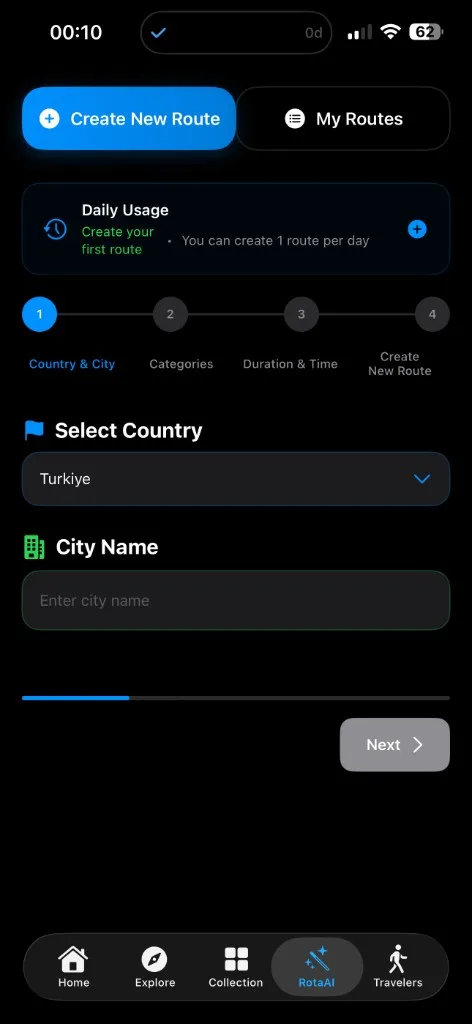
No app can have a hand-made program for every city. That's what RotaAI is for. Pick a country and a city, tell it your interests, how many days you have, your budget and your hours, and it builds a daily plan for you in seconds. Three museum-heavy days in Lisbon or a food weekend in Tbilisi, it works the same way.
We walk through how to get the most out of it, including what to tell it for better results, in our guide to building a route with RotaAI.
A collection that doesn't live on the fridge
Most travellers collect something: magnets, postcards, coins. The collection section in myRota lets you store passport stamps, magnets, postcards, coins, stamps, cups, books and playing cards with photos. Not in a spreadsheet, but in a small digital display case that's always in your pocket.
You can paint the countries you've visited on a world map, save the cities, and track how many of the New and Old Seven Wonders you've seen. There's also a one-image flag summary of your countries that's made for sharing as a story. We go deeper into this in our piece on travel collections.
Steps, badges and a monthly leaderboard
As you travel and your collection grows, you earn steps, level up and unlock badges. Every month the top 20 on the travellers leaderboard earn travel points, with 50, 30 and 10 points for the top three. Points can unlock more programs or pay for new RotaAI routes.
Traveller posts: the place through other people's eyes
The newest feature is traveller posts. You can share travel photos and tag the place or the program stop. Approved posts show up under that stop and on the program pages, so before you go somewhere you can see what it looks like on an ordinary day, not just in the brochure shot. The Explore feed collects posts from people you follow, with likes, comments, saves and @mentions.
On privacy, you can make your account private, block or report someone, and location data is stripped from your photos before they're uploaded.
How to start
- Download the app and create an account; 60 travel points are added on your first sign-in.
- Pick a country on the home screen, browse the programs and read the ratings and reviews.
- Add the one you like to your library and adjust it to your pace.
- No program for your city? Build one with RotaAI.
- Check in along the way, then update your collection and map when you're home.
The app works fully in English and Turkish. For travel content in English follow @myrotaapp on Instagram; Turkish content lives on @myrotastories.
FAQ
Is myRota free?
myRota is free to download on the App Store and Google Play and offers in-app purchases. You receive 60 travel points on your first sign-in, which you can use to unlock a program or try RotaAI.
Which countries have ready-made programs?
There are 1, 2, 7 and 14-day programs for Japan, Korea and the Balkans, plus themed routes covering Harry Potter, K-drama and Turkish TV series filming locations. For other cities you can use RotaAI.
How does RotaAI work?
You choose a country and city and tell it your interests, trip length, budget and hours. RotaAI then builds a daily plan for that city, which you can edit just like a ready-made program.
What languages is myRota available in?
The whole app is available in English and Turkish. This website is bilingual too; use the language switch at the top right.
Is myRota on iPhone and Android?
Yes. It's on the App Store for iPhone and on Google Play for Android phones.
myRota team ·
Next route
 KIX
Japan for the first time: a 14-day route from Osaka to Tokyo
Fly into Osaka, fly home from Tokyo. A 14-day first-timer route through Nara, Kyoto and Kawagoe that never doubles back, with a card for every day.
7 min readYour first solo trip: where to go, how to plan it and what to do on day one
Bag packed, ticket booked, one question on loop: what if something goes wrong? A first solo trip isn't a test of courage. It's the right city, a sane pace and a few good habits.
7 min read myRotaClass: 60 points gift
Your boarding pass is ready.
Download it, pick your first program, figure out the rest on the way.
- Passenger
- You
- From
- Here
- To
- Anywhere
- Seat
- Window
Get the app60 points gift